Home Daycare Record Keeping: What to Track and How
Running a home daycare means keeping track of children, parents, money and paperwork, often with little time to sit at a desk. Good records protect you if there is a dispute, keep you ready for licensing visits, and make tax time and parent requests easy. This checklist covers what most in-home providers track. Licensing rules differ by state, so check your state's child care licensing agency for exactly which records you must keep and for how long.
1. Enrollment records
- Child's name, date of birth and start date
- Schedule: days per week and typical hours
- Rate (weekly, monthly or daily) and what it includes
- Parent or guardian contact details
- Emergency contacts
- Authorized pickup people, and anyone not authorized
- Allergies, care notes and dietary needs
- Status: enrolled, waitlist or ended
Store sensitive medical and identification documents securely, following your state's requirements, and keep only what you need.
2. Required forms checklist
Most states require some combination of an enrollment application, emergency contact form, pickup authorization, immunization record and signed policies. Keep a simple list for each child showing which forms you have and the date each was signed or last updated. That makes it easy to see who is missing something before an inspection.
3. Daily attendance
Record each child's arrival and departure times every day. Attendance records:
- Show who was in your care at any time (important in an emergency).
- Back up your billing.
- Are often required by licensing, and by the Child and Adult Care Food Program (CACFP) if you participate, alongside meal counts.
- Let you track late pickups fairly. If you charge a late fee, a consistent rule such as a fee per minute after closing, applied from recorded times, avoids arguments.
Mark days the program was closed separately from absences.
4. Payments
For every payment, record the date, family, amount, method and what it covered (tuition, registration, late fee). Give a receipt for each payment. Track balances so you know who is behind before it becomes a large amount.
| Date | Family | Type | Amount | Method |
|---|---|---|---|---|
| 2027-01-04 | Family A | Tuition, week 1 | $220 | Bank transfer |
| 2027-01-04 | Family A | Late fee | $10 | Bank transfer |
| 2027-01-05 | Family B | Registration | $50 | Check |
5. Year-end statements for parents
Parents who claim the federal Child and Dependent Care Credit report what they paid to their care provider on IRS Form 2441, and they will often ask you for a year-end total. A statement listing what each family paid during the calendar year, split by type, answers the question quickly. Parents may also ask for your provider details; the IRS publishes Form W-10 for that purpose. Keep your own copy of everything you give out.
6. Business expenses
Track expenses as they happen: food, supplies, toys, insurance, training, licensing fees and a share of home costs where allowed. Keep food costs separate, since they are often a large share of spending. Home daycare providers have specific IRS rules for the business use of the home (see IRS Publication 587), which depend on hours the space is used; keep a record of your operating hours.
7. A weekly routine
- Check that attendance is complete for every day.
- Record payments received and send receipts.
- Follow up on any balance due.
- Enter the week's expenses.
- Look at the forms list for anything expiring or missing.
Capacity and waitlist
Your license sets a maximum number of children, and often limits by age group. Track enrolled children against capacity on each day of the week, since part-time schedules can leave some days full and others open. A short waitlist with contact dates helps fill openings quickly.
Want this as a ready-made template?
Everything above works with pen and paper. If you would rather have the math done for you, these are our related templates. They are paid digital downloads on Etsy; check each listing for current price, file format and details.
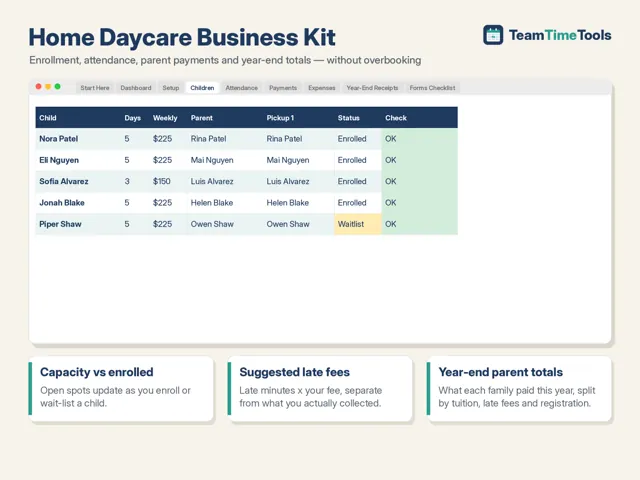
Home Daycare Business Kit
Enrollment, daily attendance, parent payments, suggested late fees and a year-end payment total per family for in-home providers. Excel and Google Sheets.
View on Etsy : Home Daycare Business Kit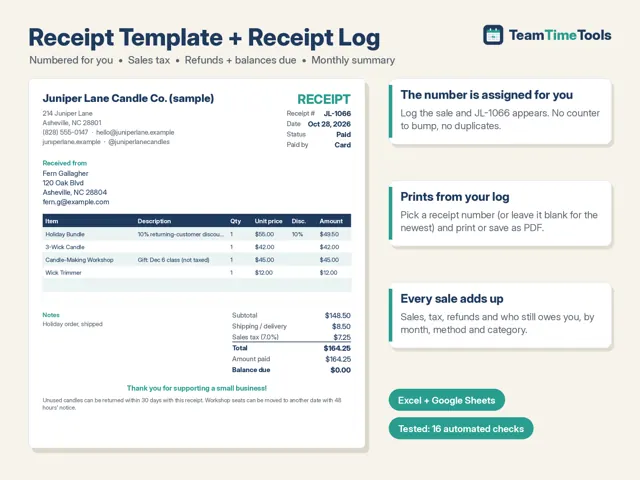
Receipt Template & Receipt Log
Auto-numbered printable receipts, sales tax worked out, and a sales log that totals by month. Excel and Google Sheets.
View on Etsy : Receipt Template & Receipt LogSources
- IRS: About Form 2441
- IRS Publication 587, Business Use of Your Home
- USDA: Child and Adult Care Food Program
This guide is general information, not professional advice. Rules and recommendations change; confirm with the official sources above.